
The ADA Title II website accessibility deadlines are April 26, 2027 and April 26, 2028, but the date depends on the public entity responsible for the service. A small department does not automatically get the later date, and a school district is not automatically a special district government.
This guide covers the ADA Title II rule for state and local government web content and mobile apps, with working examples of barriers and fixes. The examples use fictional service interfaces built locally; they are not client audit results. Sources were checked on October 22, 2026. Check the current rule again when setting a project deadline.
Why some articles still show a 2026 deadline
The original 2024 rule used earlier dates. The Department of Justice's April 2026 interim final rule extended both groups by one year. The current regulation reflects the dates below. A planning document based only on the original announcement may be out of date.
Who must comply in 2027, and who gets 2028?
April 26, 2027: populations of 50,000 or more
A public entity with a total population of 50,000 or more, other than a special district government, falls in the 2027 group. Exactly 50,000 is in this group. For example, a fictional city with a qualifying population of 64,000 would use April 26, 2027. A department of that city would not count its own staff or website visitors to obtain a different date.
April 26, 2028: smaller entities and special district governments
Public entities with populations below 50,000, and special district governments regardless of population, fall in the 2028 group. A fictional town with a qualifying population of 18,000 would use April 26, 2028. A legally qualifying special district government would also use that date even if it serves more than 50,000 people. These categories and dates come from 28 CFR §35.200(b).
Use the responsible entity's population, not a convenient number
DOJ directs most governments to 2020 Census population data. A city library or police department without its own Census population uses the larger government it belongs to. City and county school districts use the city or county population; independent school districts use the relevant Census Small Area Income and Poverty Estimates. School districts are not special district governments under this rule. See DOJ's population and school-district guidance.
Before setting a date, record the legal entity, whether it is a separate government or a subunit, the population source and who reviewed the classification. Confirm the entity's relationship to a housing authority, college program or capital-project website. Enrollment, tenant counts, website traffic and web-team size do not replace that review. A client name or the word “district” alone does not establish the answer.
For example, a fictional university that is legally an instrumentality of a state with 6.2 million residents would use 2027, even in a small campus town. A fictional community college that is an instrumentality of a county with 41,500 residents would use 2028. Those assumed legal relationships matter. DOJ's analysis in Appendix D explains the population treatment for government instrumentalities.
Which websites and services are in scope?
Title II includes state and local governments and their departments, with public schools, community colleges, universities, libraries and transit among DOJ's examples. Their existing duties to provide effective communication and equal access apply before the new technical deadlines too. The extra year is not a permission to leave a person unable to use a current service. DOJ's compliance guide.
The web rule names WCAG 2.1 Level AA, including Level A criteria and conformance requirements. It covers content and mobile apps supplied directly or through contractual and licensing arrangements. An outsourced application or payment system should therefore be part of the inventory, not dismissed as the vendor's problem. Current regulatory text.
dirango also works toward WCAG 2.2 AA where agreed. Keep the project's acceptance checklist mapped to the applicable legal standard; a newer version number is not itself evidence that a particular site meets it. W3C explains the version differences, including the removal of Parsing in 2.2. This rule incorporates the June 2018 WCAG 2.1 standard. DOJ's Appendix D analysis says criterion 4.1.1 remains required under it, subject to §35.205's limited provision; keep that distinction in the acceptance checklist.
Private businesses and private nonprofits do not inherit these two Title II dates simply because they have a website. Their accessibility responsibilities need a separate scope review; “outside this deadline” does not mean “no accessibility obligation.” DOJ's general web accessibility guidance distinguishes Title II public entities from Title III businesses open to the public.
Some organizations also receive HHS financial assistance. Their Section 504 web rule has a separate timetable based on recipient employee count: May 11, 2027 for recipients with 15 or more employees and May 10, 2028 for recipients with fewer than 15. A public entity may have to assess both laws; the Title II population test does not decide its Section 504 date. The extension did not remove the recipient's existing duty to provide accessible services. HHS's current deadline notice explains the distinction.
What actually needs fixing? Three working examples
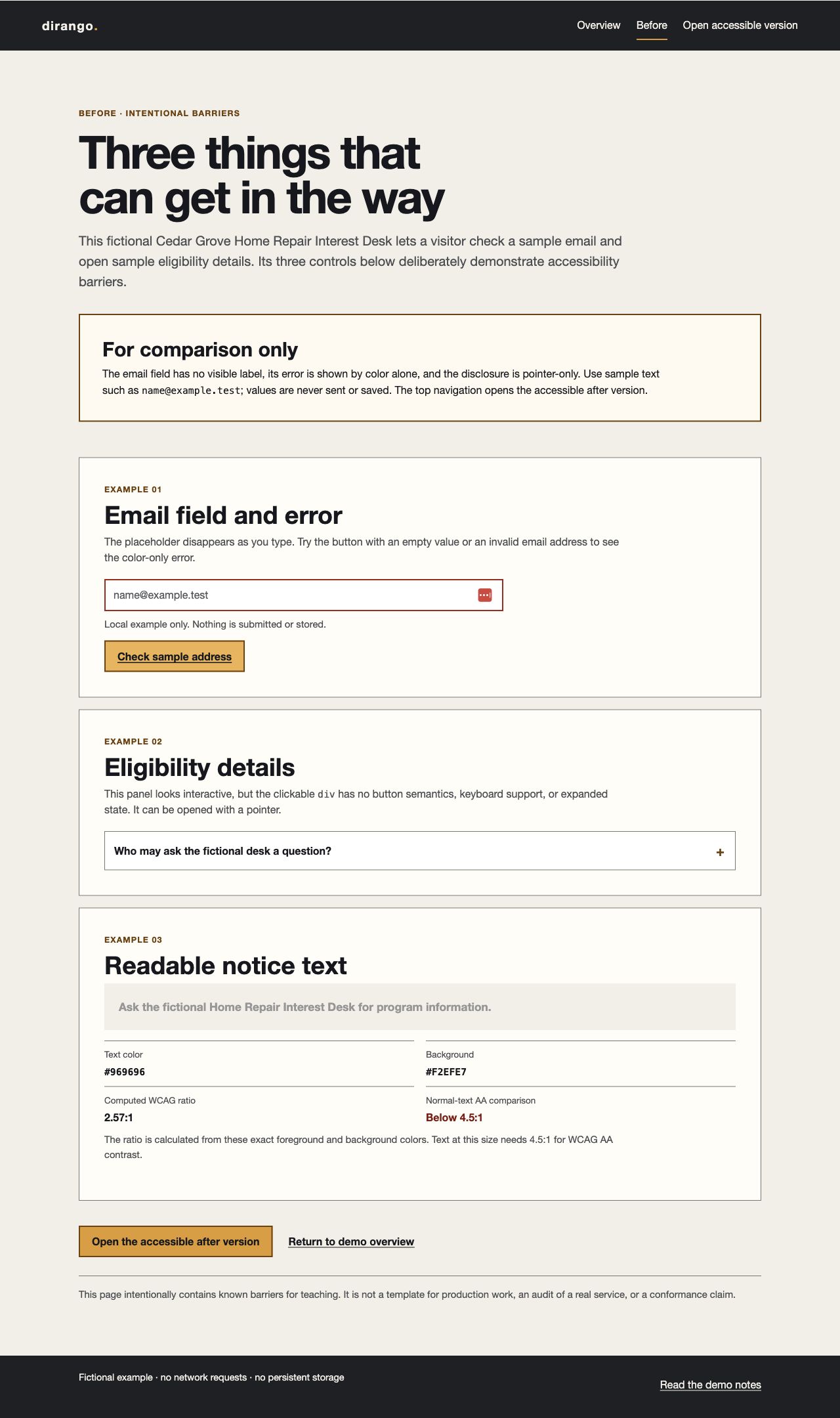
A resident may need to submit an inquiry, understand eligibility or act on a notice. Test those tasks directly. Our local remediation demonstration source download pairs a deliberately flawed interface with a repaired one. Its content is fictional; it sends nothing and stores no submissions.
The screenshots are actual browser captures, and the code excerpts come from the runnable demo. Its full source and test instructions are available there. These checks cover the examples only; they do not establish a government site's overall conformance or legal status.
1. A form that identifies the problem and helps the resident recover
A placeholder saying “Email” disappears after typing. A red outline alone does not explain the error and may not give a screen-reader user useful feedback. In the flawed demo, checking an empty field changes only its outline.
The repaired example keeps a visible label, marks the field required, associates instructions and the error with the input, and focuses a linked error summary when correction is needed. Its success message explicitly says the demonstration has not sent anything. These changes address the task of finding, understanding and correcting the field. W3C's form-notification guidance explains error association and focus after an invalid submission.
<label class="field-label" for="after-email">
  Email address <span class="required-note">Required</span>
</label>
<input id="after-email" type="email" autocomplete="off" required
  aria-describedby="after-email-help after-email-error">
<p id="after-email-help" class="field-help">
  Enter a sample address such as name@example.test.
  This value stays in the page and is never sent or saved.
</p>
<p id="after-email-error" class="field-error" hidden>
  Enter an email address in a familiar format, such as name@example.test.
</p>
On a failed check, the demo also sets aria-invalid="true", reveals an error summary with a correction link, and focuses that summary. A valid value clears the error and updates a role="status" region. The deliberately non-sending example uses autocomplete="off"; a real contact form normally benefits from autocomplete="email" and needs server-side validation as well as accessible client feedback.
Retest: check an empty field, then an invalid email. Confirm that a specific message appears and focus moves to the summary. Follow its correction link to the field, correct the value and check again. Check that the invalid state clears and the local confirmation appears. Review the accessible name and description, then test the journey with a screen reader before accepting it on a real site.
Relevant checks include meaningful relationships (1.3.1), text-based error identification (3.3.1), labels or instructions (3.3.2), and status messages (4.1.3). Check the whole journey rather than treating ARIA attributes as a pass by themselves.
2. Eligibility details reachable without a mouse
The flawed panel uses a clickable div. A mouse click can open it, but ordinary keyboard navigation skips that control. Someone may miss information they need before applying.
The repaired version uses a native button, exposes whether it is expanded, and identifies the panel it controls. Enter and Space activate it. Collapsing the panel leaves focus on the button, following the WAI disclosure pattern.
<button class="disclosure-button" type="button" aria-expanded="false" aria-controls="after-eligibility-details" data-after-disclosure>
    <span>Who may ask the fictional desk a question?</span>
    <span class="disclosure-indicator" aria-hidden="true">+</span>
  </button>
<div class="details-panel" id="after-eligibility-details" hidden>
  <p>In this fictional example, homeowners and renters may ask the desk for information. This is sample service text, not a real eligibility rule or application.</p>
</div>
const afterDisclosure = document.querySelector("[data-after-disclosure]");
if (afterDisclosure) {
const panel = document.getElementById(afterDisclosure.getAttribute("aria-controls"));
const indicator = afterDisclosure.querySelector(".disclosure-indicator");
afterDisclosure.addEventListener("click", () => {
const expanded = afterDisclosure.getAttribute("aria-expanded") === "true";
afterDisclosure.setAttribute("aria-expanded", String(!expanded));
indicator.textContent = expanded ? "+" : "−";
panel.hidden = expanded;
});
}Retest: reach the control with Tab, open it with Enter, close it with Space and check that the expanded state tracks the content. Confirm focus stays visible and the next Tab reaches the expected destination. A visual screenshot cannot prove keyboard operation; that needs an interaction test.
Relevant checks include keyboard access (2.1.1), visible focus (2.4.7), and the programmatic name, role and state (4.1.2).
3. A notice residents can read
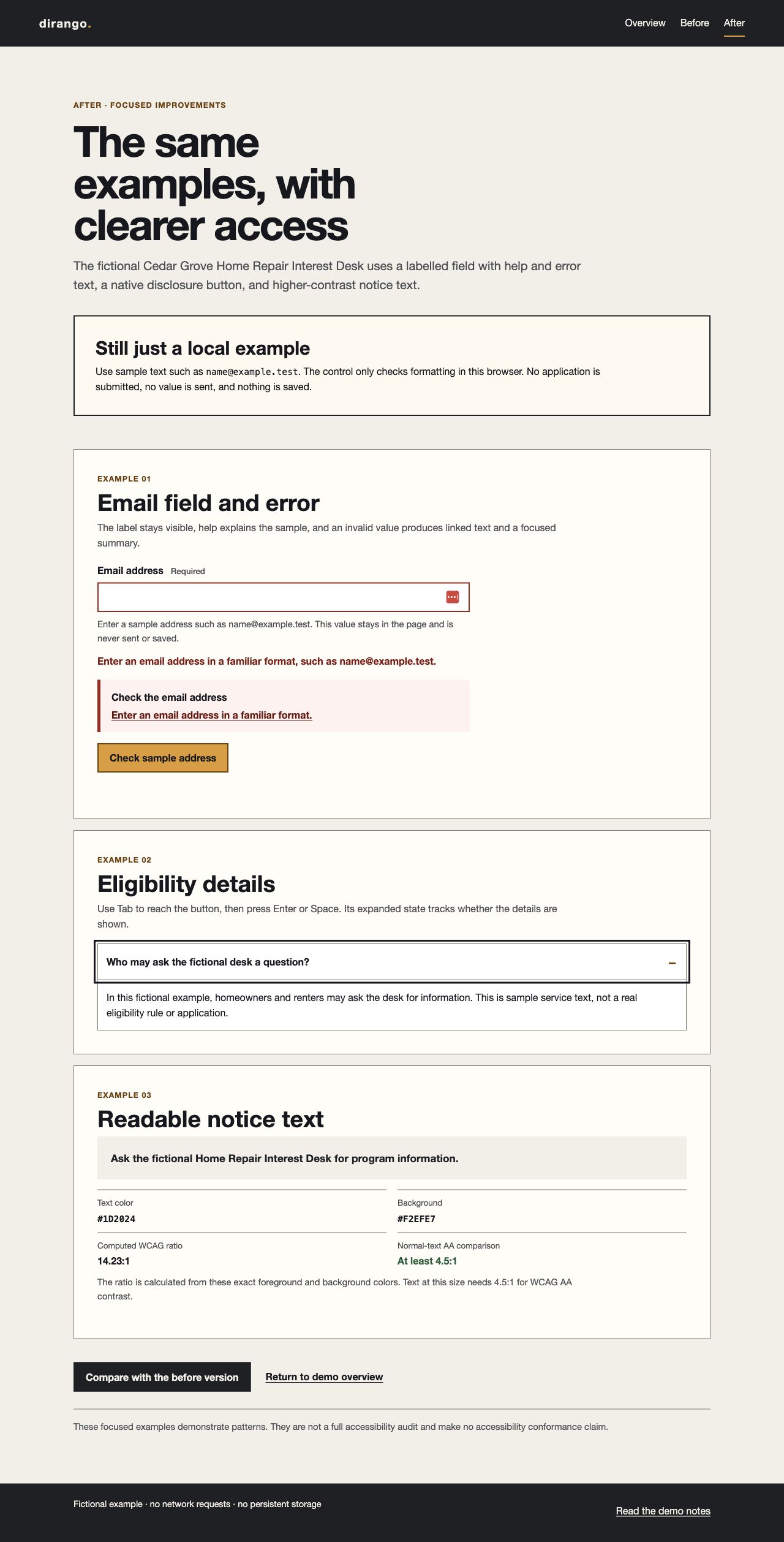
Muted text can make a page feel quieter, but low contrast makes deadlines and next steps harder to read.
Our sample notice changes the normal-size text from #969696 on #F2EFE7 (2.57:1) to #1D2024 on the same background (14.23:1). The comparison uses exact CSS foreground and background colors, not a screenshot's anti-aliased pixels. WCAG's normal-text minimum is 4.5:1; qualifying large text uses 3:1. A ratio just below the threshold must not be rounded up to pass. W3C's contrast guidance.
Retest: inspect the computed colors in every relevant state, including links and messages. Check focus outlines and control borders separately; a good paragraph ratio does not establish that the entire interface passes. Also review at narrow widths and zoom rather than assuming that readable desktop text settles the issue.
Documents, images and videos belong in the inventory too
A scan of a housing application is not fixed by adding an accessibility statement to the homepage. Check whether the text is available to assistive technology, whether headings and labels are meaningful, and whether the reading order follows the intended sequence. OCR alone does not establish that a PDF has a usable structure or fillable controls. W3C's PDF reading-order technique includes manual checks of document order and keyboard navigation.
For a project gallery, decide what information each image conveys. A filename such as IMG_0421.jpg is not an alternative for a meaningful progress photograph; decorative images need different treatment. For a meeting recording, check captions for speech and relevant sounds, with other media alternatives evaluated against the content. W3C non-text content guidance, prerecorded captions guidance.
An annual-report microsite can make headings and navigation easier to implement, but HTML is not automatically accessible. Its charts, videos, donation handoffs and downloadable documents still need review. Our Ten Strands report article explains that publishing workflow.
Do old PDFs or archived pages get an exception?
Some preexisting conventional documents may qualify for an exception, but a document currently used to apply for, access or participate in a service does not qualify merely because it is old. Archived web content must meet all four conditions: creation before the compliance date or reproduction of preexisting physical material; retention only for reference, research or records; placement in a designated archive; and no subsequent change.
The rule also addresses certain individualized secured documents, preexisting social posts and qualifying third-party posts. These are limited exceptions, not a blanket exemption for PDFs, password-protected sites or vendor products. Keep a documented reason for each claimed exception and review continuing access obligations. DOJ's exception explanations.
Turn the deadline into a remediation plan
Start with an inventory of public tasks: applications, appointments, payments, listings, meeting information, documents and mobile apps. Identify the owner and vendor for each task. Then select representative templates and complete journeys, including errors and authenticated steps where relevant.
A useful issue record contains a URL or document, the affected task, reproduction steps, criterion, severity, responsible owner, proposed fix and retest evidence. “Accessibility score: 92” is not enough for a developer to reproduce a barrier or for a program owner to judge whether someone can apply.
Repair shared components first where they affect many journeys, while prioritizing barriers that stop access. Combine automated checks with keyboard, screen-reader, mobile/zoom and document review. Retest the actual fix in the release being accepted; keep unresolved issues visible instead of treating the audit as the end of the work.
After launch, train editors and repeat checks when templates, plugins, forms or documents change. dirango offers accessibility audits and implementation with weekly or monthly review scopes, plus website governance for ownership and publishing controls. Use the project form to share the entity, services, platforms and deadline you are planning around.
To plan assessment and implementation, see the accessibility audit checklist: scope, manual checks and verified fixes.
Need help with your site?
We offer website accessibility. Send us the site and what you need help with, or read more about the service.