
When staff copy one location address into three program pages and an event listing, the next address change can leave a stale copy behind. Store the location once and let each page refer to that record. That is the job of a small content model: each fact has a home, and the relationships between records are visible.
Use a taxonomy for a label or grouping, a custom post type when a record has its own fields and publishing life, and post metadata for facts that belong to one record. Model a relationship only when editors need to maintain or query that connection; not every pair of pages needs a database-style link.
The walkthrough runs in a disposable WordPress Playground. Harborlight Community Network and every location, program, address, schedule, and event are fictional sample data, not facts about an operating nonprofit.
Model the records editors actually maintain
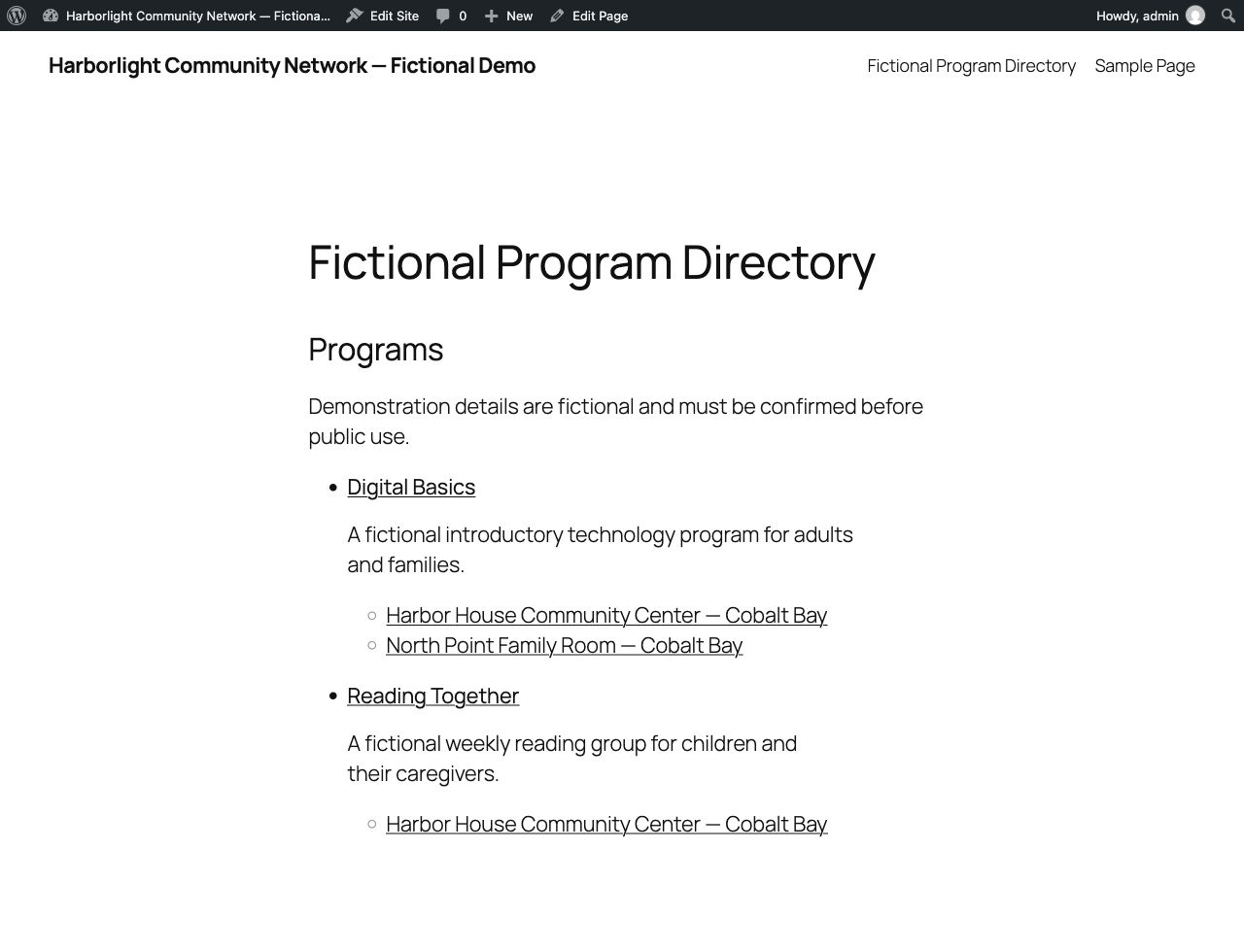
The demo uses three content types: Program, Location, and Event. Programs can share locations, while each event belongs to one program and one of its assigned locations. These are editorial rules as much as data rules: they determine which combinations an editor can publish and what a public page can show.
The sample contains two programs, two locations, two events, and a directory page. Both programs use Harbor House Community Center; only Digital Basics also uses North Point Family Room. That means an event at North Point cannot be attached to Reading Together. Stable seed keys let the Blueprint update these seven records on another run instead of making duplicates.
WordPress’s register_post_type() function supplies the content type, editor support, archive, public routes, and REST integration. Setting show_in_rest enables the block editor for the type. Register the type on WordPress’s init action; the excerpt below shows the arguments, not the plugin hook. The plugin gives each type its own capability names and maps object-level checks, then explicitly grants those capabilities to administrator and editor roles. Custom capability names do not grant roles access by themselves, so a production plugin must define both the mapping and the role policy. Ordinary subscribers cannot edit these records. See the WordPress function reference for the available arguments and their defaults.
register_post_type(
    $post_type,
    array(
        'public'          => true,
        'show_in_rest'    => true,
        'has_archive'     => true,
        'rewrite'         => array( 'slug' => $slug, 'with_front' => false ),
        'rest_base'       => $slug,
        'supports'        => array( 'title', 'editor', 'excerpt', 'revisions' ),
        'capability_type' => array( $capability_singular, $capability_plural ),
        'map_meta_cap'    => true,
    )
);
One definition list registers all three types; it does not combine their records. Editors keep a program’s audience and schedule on its Program post, a location’s address and access details on its Location post, and an event’s start time and two relationships on its Event post. A location deserves its own post because it has its own hours, accessibility details, and public page as well as an address.
Keep relationship data narrow
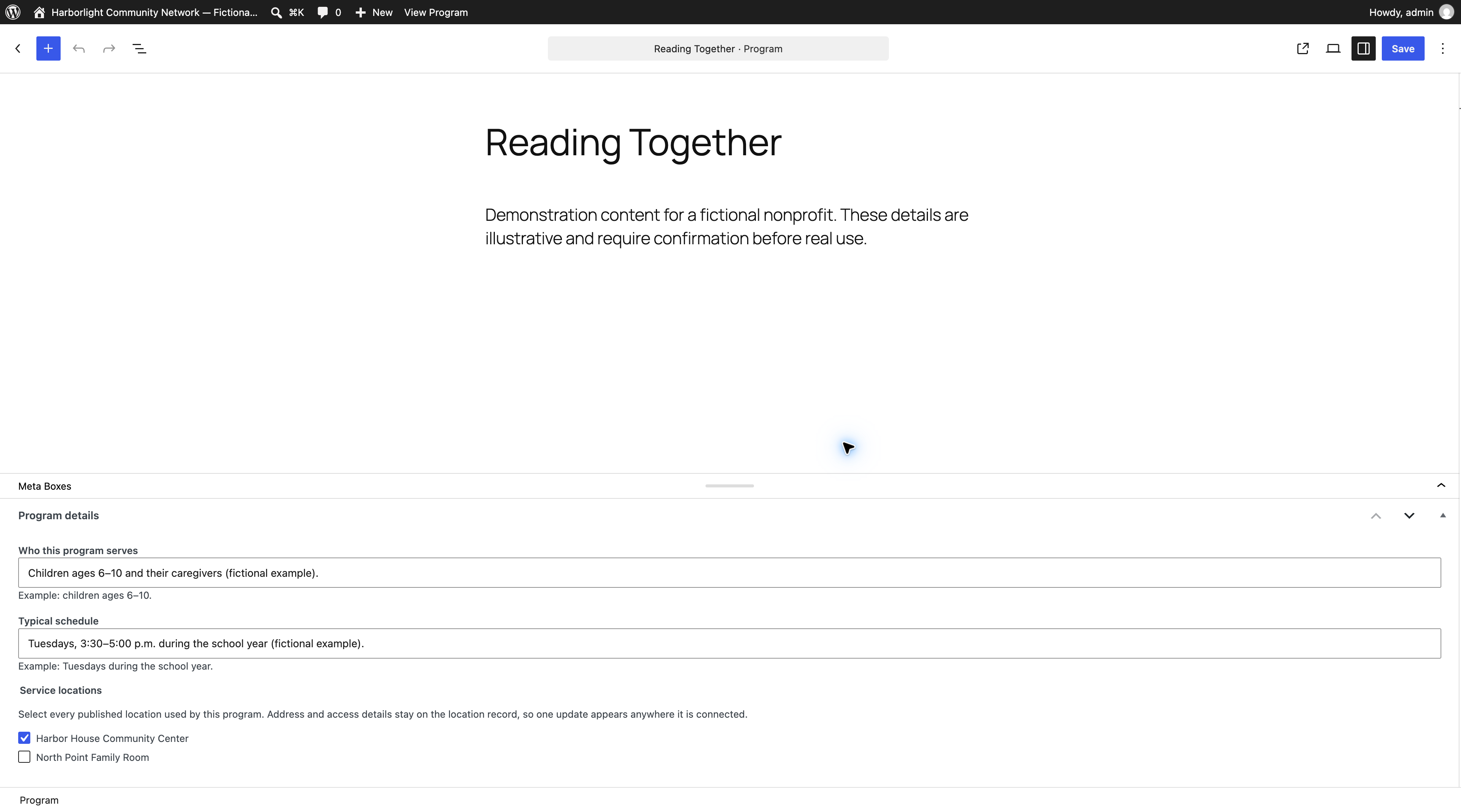
The program stores a list of location post IDs. Each ID must point to a published Location post. The event stores a Program ID and Location ID; before saving, the plugin checks that both posts are published and that the chosen location is assigned to the chosen program. During rendering it repeats that check. If older or malformed metadata no longer describes a valid relationship, the page leaves those event details out.
The metadata is registered with WordPress and sanitized before storage. The editing panels are the write interface in this example; these relationship fields are not exposed for arbitrary REST writes. This is useful when an API consumer should not be able to bypass a rule that involves two fields and a third post. WordPress’s `register_post_meta()` reference links to the supported metadata arguments, including the type, sanitizer, and authorization callback.
register_post_meta(
    self::PROGRAM,
    '_dcm_location_ids',
    array(
        'type'              => 'array',
        'single'            => true,
        'default'           => array(),
        'sanitize_callback' => array( __CLASS__, 'sanitize_program_location_ids' ),
        'auth_callback'     => array( __CLASS__, 'can_edit_registered_meta' ),
        'show_in_rest'      => false,
    )
);
In the editor, a program gets a labelled list of published locations; the location form holds the address, hours, and access note. The event form offers program and location selectors and checks that pair on save. Visible labels and help text explain each relationship, so the task does not depend on color or placeholder text.
Saving a meta box needs more than a nonce. The handler checks the user’s permission to edit that specific post, ignores autosaves and revisions, verifies a post-specific nonce, unslashes the plugin’s field group, and sanitizes each named value. WordPress documents the purpose and limits of nonces and provides a meta box guide that calls out security checks omitted from its illustrative example.
if ( ! current_user_can( 'edit_post', $post_id ) || ! isset( $_POST[ self::NONCE ] ) ) {
    return;
}

$nonce = sanitize_text_field( wp_unslash( $_POST[ self::NONCE ] ) );
if ( ! wp_verify_nonce( $nonce, 'dcm_save_' . $post->post_type . '_' . $post_id ) ) {
    return;
}
For events, a mismatched pair clears the event’s relationship fields and shows an error after the save. That prevents a plausible but incorrect event location from remaining on the page. The validator below is used by the save handler, by the event renderer, and by the runtime check:
public static function is_valid_event_relationship( $program_id, $location_id ) {
    $program_id  = self::sanitize_event_program_id( $program_id );
    $location_id = self::sanitize_event_location_id( $location_id );
    if ( ! $program_id || ! $location_id ) {
        return false;
    }
    return in_array( $location_id, self::stored_location_ids( $program_id ), true );
}
The public views use headings, lists, address, and time elements to explain the connections without a map, and escape text for its output context. A [dcm_program_directory] shortcode creates a bounded list of published programs; a program page adds its connected location and event details after the editor’s content. WordPress’s Shortcode API says handlers return replacement markup, while its escaping guidance recommends escaping when the output is rendered.
Verify the shared value in a real WordPress runtime
The useful check is whether one edit reaches both pages. The demo temporarily changes Harbor House’s address, renders Reading Together and Digital Basics through the same program-detail renderer, confirms the new address appears on both, then restores the seeded value. Neither program stores its own copy.
The Blueprint also checks the valid Digital Basics–North Point pair and rejects the invalid Reading Together–North Point pair. It creates a temporary subscriber, attempts an update through the WordPress REST API, confirms that the response is denied and the program title stays the same, then removes the temporary account. A second seed pass must leave the fixture IDs and counts unchanged. These checks run in WordPress with its SQLite database under Playground; they are not static source-only assertions.
The runtime receipt is dated October 12, 2026 and records WordPress 7.1.3 with PHP 8.3.33. Before and after reseeding, it reports two programs, two locations, two events, one directory page, and unchanged fixture IDs. The temporary address appeared on both program pages and was restored; the relationship validator and save handler rejected the unassigned location; and a subscriber’s REST update returned HTTP 403 without changing the program title. See the local runtime receipt for the recorded results.
The complete local demo bundle includes the Blueprint, plugin source, and fixture runner. The plugin ZIP can be inspected separately. With the pinned official CLI package and a compatible Node runtime, run the Blueprint from its directory:
npx --yes @wp-playground/cli@3.1.58 run-blueprint \
  --blueprint=./ \
  --blueprint-may-read-adjacent-files
WordPress Playground Blueprints describe a repeatable disposable site setup; the official Blueprint guide covers local bundles, plugin installation, and steps. The same package can start an interactive instance on loopback so you can inspect the public directory and admin editor. Its deliberately simple admin / password login is for the disposable instance only. Replace it before using any similar setup beyond local review.
Decide what a production model still needs
This model handles multiple locations per program and one program/location pair per event. It does not handle recurring schedules, capacity, registration, cancellations, private addresses, translations, or third-party calendar data. It uses built-in post metadata rather than a custom table or relationship-field plugin. Before adapting it, decide who maintains each field, which details are public, how a retired location is handled, and what happens to an event when its program is unpublished.
The example’s custom capabilities go to administrators and editors; a real organization may need a narrower editorial role and a review workflow. The plugin also needs theme-level visual and accessibility review with real content, keyboard testing of the editor task, and any project-specific performance or migration checks. The demo’s structural checks do not establish full WCAG conformance or production readiness.
If the same program, location, event, or service fact appears in several places, write down where it lives now and which pages should change with it. dirango’s custom WordPress development work can plan the model, editor controls, and templates around that workflow. For an existing site, WordPress support covers an agreed mix of upkeep and planned work. When you contact dirango, include an example of information your team has to update in several places.
Need help with your site?
We offer WordPress development. Send us the site and what you need help with, or read more about the service.