
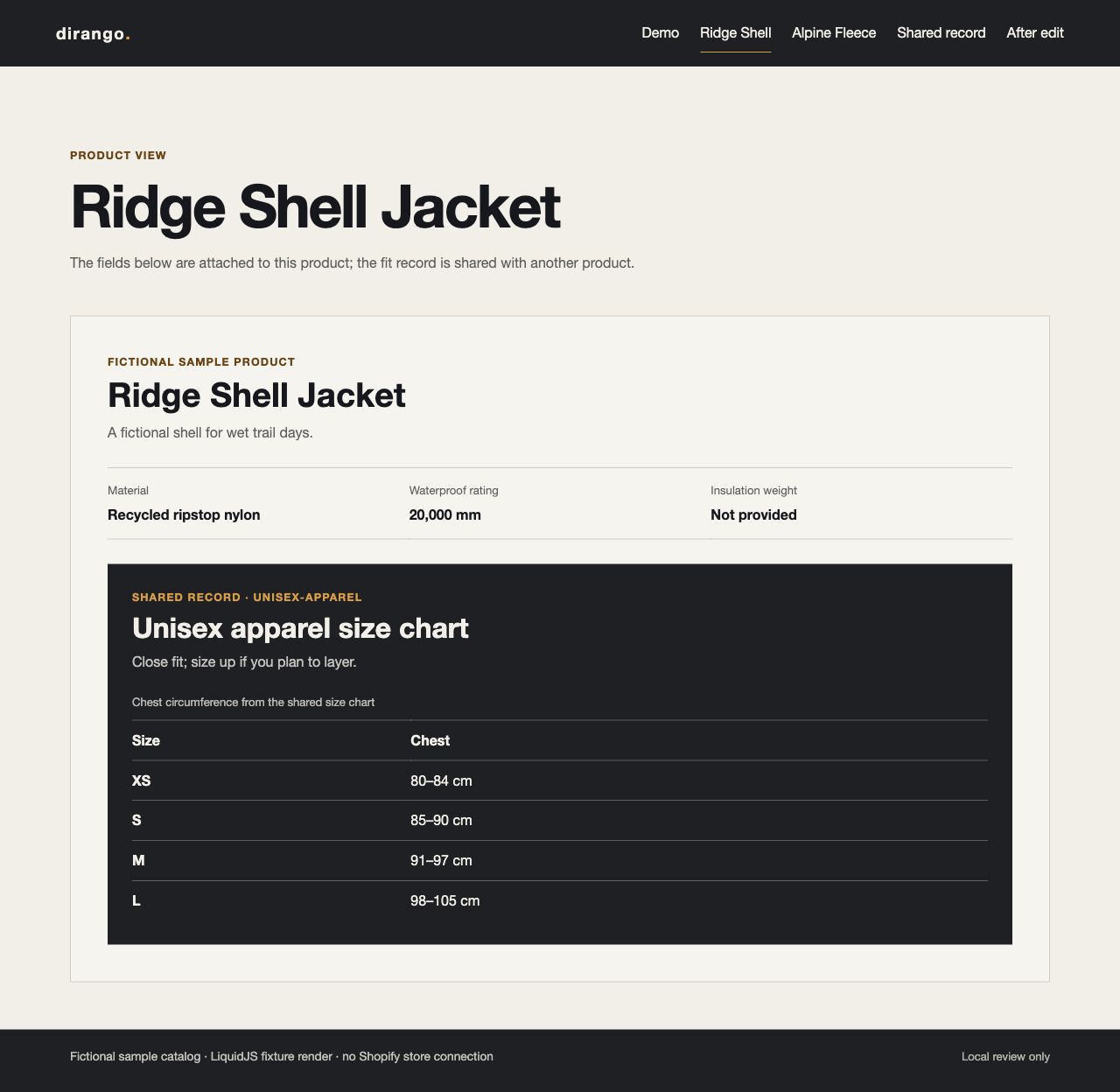
A product metafield stores a property on a product. A metaobject defines a separate structured record that can be linked from one or more resources. In this local example, two fictional outdoor-apparel products hold their own material and technical specifications, then point to one shared size chart.
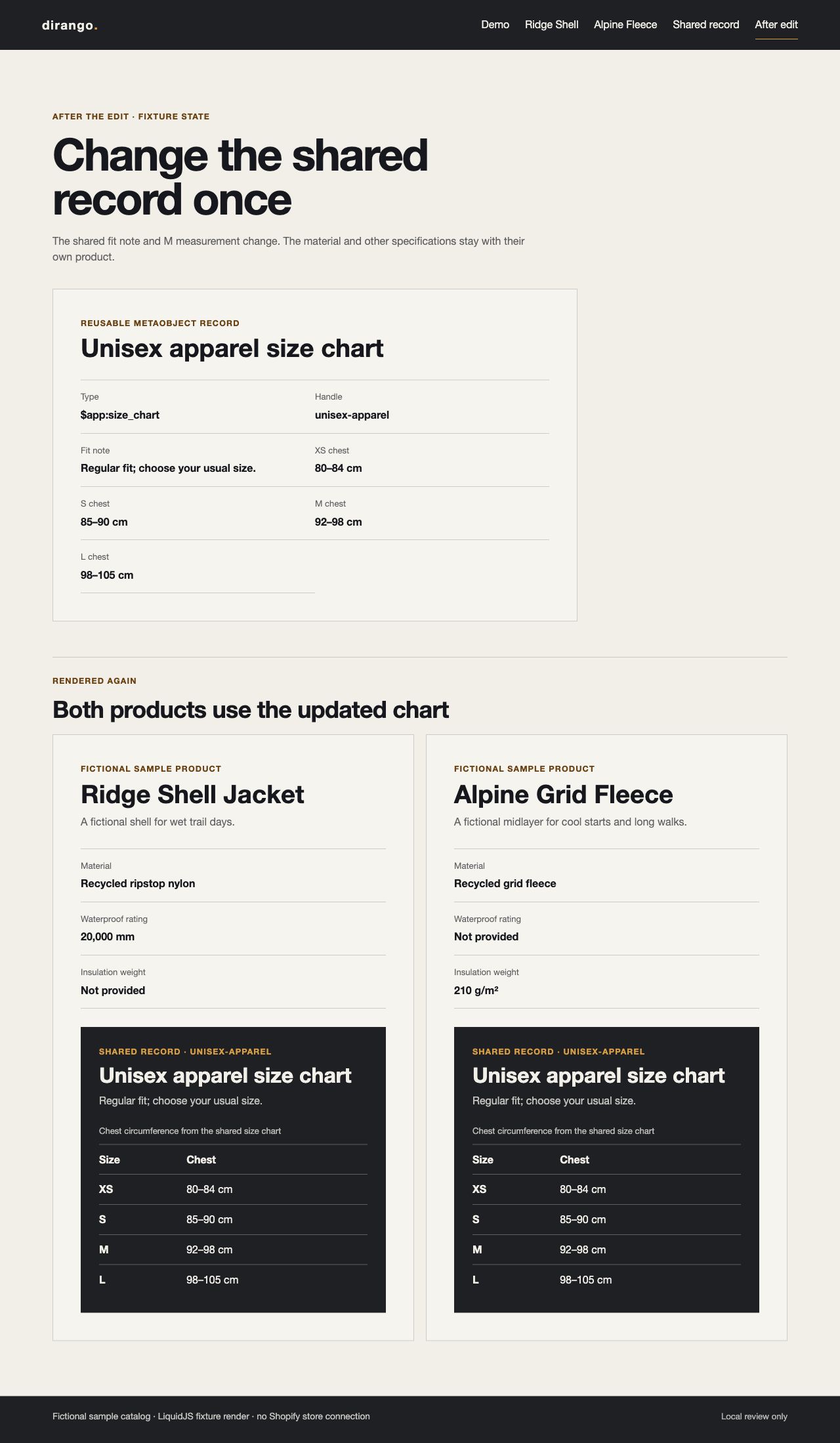
The sample Ridge Shell Jacket has a material and waterproof rating; the Alpine Grid Fleece has its own material and insulation weight. Both reference the apparel chart. Change that record and both pages show the new fit guidance, while each product keeps its own specifications. These invented fixtures are not a live store or a measured business result.
If a fact changes with the selected option, store it on the variant; Shopify supports product and variant metafield owners in the Admin API. If it is shared across a product’s variants, use a product metafield. If several resources need the same structured record, reference a metaobject. The merchant should be able to update each value where it belongs.
Define fields before adding product data
Shopify describes metafields as additional properties on existing resources and metaobjects as records with their own definitions and entries. The custom data guide uses a size chart as an example of data that can be modeled as a metaobject and attached to products through metafield references. That is the relationship used here.
This demo defines app-owned data in a shopify.app.toml fragment. TOML uses the reserved app namespace through the app table name. In Admin GraphQL, the corresponding namespace is $app; the metaobject type is $app:size_chart. Shopify’s definition guidance documents this TOML convention and the merchant_read_write setting used when merchants need to edit values in the admin.
[product.metafields.app.size_chart]
name = "Apparel size chart"
type = "metaobject_reference<$app:size_chart>"
access.admin = "merchant_read_write"

[metaobjects.app.size_chart]
name = "Apparel size chart"
display_name_field = "name"
access.admin = "merchant_read_write"

[metaobjects.app.size_chart.fields.name]
name = "Chart name"
type = "single_line_text_field"
required = true

[metaobjects.app.size_chart.fields.fit_note]
name = "Fit note"
type = "single_line_text_field"

[metaobjects.app.size_chart.fields.m_chest_cm]
name = "M chest circumference"
type = "single_line_text_field"
The sample measurements are text because the storefront only displays them. If shoppers or store tools need numeric comparisons, filtering, or calculations, store a number and keep its unit explicit in the field label or data. Do not parse a formatted string later to recover a number.
The downloadable definition fragment also defines the XS, S and L measurement fields. The demo grants merchant editing on the app-owned values while the app remains the owner of the definitions. It leaves Storefront API access at the default. Liquid theme access does not depend on that setting; a headless Storefront API consumer would need its own explicit access decision, as Shopify explains in its data-modeling guide.
Create the shared record, then attach it
After the app’s definitions exist, the Admin API can create or update a chart entry. The example uses a stable handle and the app-owned type. The response includes the record ID needed by the product reference write. No example GID is invented here: when using the operation, supply real product IDs from the intended development store and pass the returned metaobject ID into the next operation.
mutation UpsertSizeChart($handle: MetaobjectHandleInput!, $values: JSON!) {
  metaobjectUpsert(handle: $handle, values: $values) {
    metaobject { id }
    userErrors { field message }
  }
}
The sample upsert variables use $app:size_chart, the unisex-apparel handle, and values for the chart name, fit note, and chest measurements. This operation uses the Admin API’s 2026-07 shape and was checked against Shopify’s metaobjectUpsert reference. It requires write_metaobjects; the separate product-data query requires read_products and read_metaobjects. Pay attention to update semantics: values replaces the full field map, so Shopify clears any existing field you leave out. Send the complete record when editing it.
The next operation links one product to the shared record; repeat it for each product that uses the chart. Shopify’s metafield management guide describes metafieldsSet for standalone value writes. The full downloadable operation also writes the independent product fields. The schema definitions must already exist and match each value’s type.
mutation LinkSizeChart($productId: ID!, $sizeChartId: String!) {
  metafieldsSet(
    metafields: [{
      ownerId: $productId
      key: "size_chart"
      type: "metaobject_reference"
      value: $sizeChartId
    }]
  ) {
    metafields {
      owner { ... on Product { id } }
      key
      value
    }
    userErrors { field message code }
  }
}
The operation omits namespace because Shopify resolves the app namespace for app-owned metafields; do not send app as a literal namespace in Admin GraphQL. Use the size-chart ID returned by the earlier upsert and repeat this reference write for each product. The snippet is illustrative and was not run against a store. The app also needs the relevant write access, including write_products for these product fields.
Read it back and render it carefully
The read query fetches each product’s specifications and follows its size-chart reference to the shared fields. It was checked against the same API schema; Shopify’s validator reports read_products and read_metaobjects as the required scopes. On the storefront, the Liquid must follow those references and read the value on each metafield and metaobject field.
The product snippet follows the shared-record reference, gives missing data an explicit fallback, and escapes values as it renders them. The excerpt shows the fit note; the full snippet also prints the measurements and handles a missing chart.
{% assign size_chart = product.metafields.app.size_chart.value %}
{% if size_chart != blank %}
  {{ size_chart.fit_note.value | default: "Not provided" | escape }}
{% else %}
  Size chart unavailable
{% endif %}
Shopify’s Liquid metaobject reference shows field values accessed through .value. The demo uses the same pattern for the linked record, with product.metafields.app.size_chart.value yielding the referenced metaobject. The snippet then reads size_chart.fit_note.value and each measurement, escaping every displayed value. Missing values are labeled “Not provided”; a missing reference gets a separate “Size chart unavailable” message. The page does not silently imply that an absent specification is zero, measured, or known.
What the local check proves
Five generated HTML views cover the two product pages, a shared-chart inspector, and the pages after changing the chart’s fit note and M measurement. A local runner executes the actual Liquid snippets with LiquidJS 10.30.0 against JSON fixtures shaped like product and metaobject objects. It removes the Shopify {% doc %} metadata block before running the rest through LiquidJS. The fixtures contain handles and values, not store IDs.
The five local automated checks confirm that an edit to the shared chart appears on both product pages, product-specific specifications stay with their products, missing values get explicit fallbacks, rendered values are escaped, and rendering neither changes the fixture nor makes a network request. Shopify’s Liquid validator accepted both snippets; its only notices were that the minimal fixture theme does not reference them. The Admin GraphQL validator accepted the upsert, write, and read operations against 2026-07.
The checks do not install an app, validate TOML against an authenticated store, create a Shopify definition, inspect a live theme, or call the Admin API. The HTML comes from local Liquid fixtures, not a live Shopify Admin or storefront test. For a store implementation, validate the app configuration with Shopify CLI, install it in a development store, test how a merchant edits the record, read the values back, and preview the Liquid on representative products. This sample requested no store authentication or access grant.
The local demo source source download includes the fixture, snippets, and downloadable operations. For a store-specific model, bring a representative product and the fields that must be shared to dirango’s Shopify design and development service or contact dirango.
Need help with your site?
We offer Shopify design and development. Send us the site and what you need help with, or read more about the service.